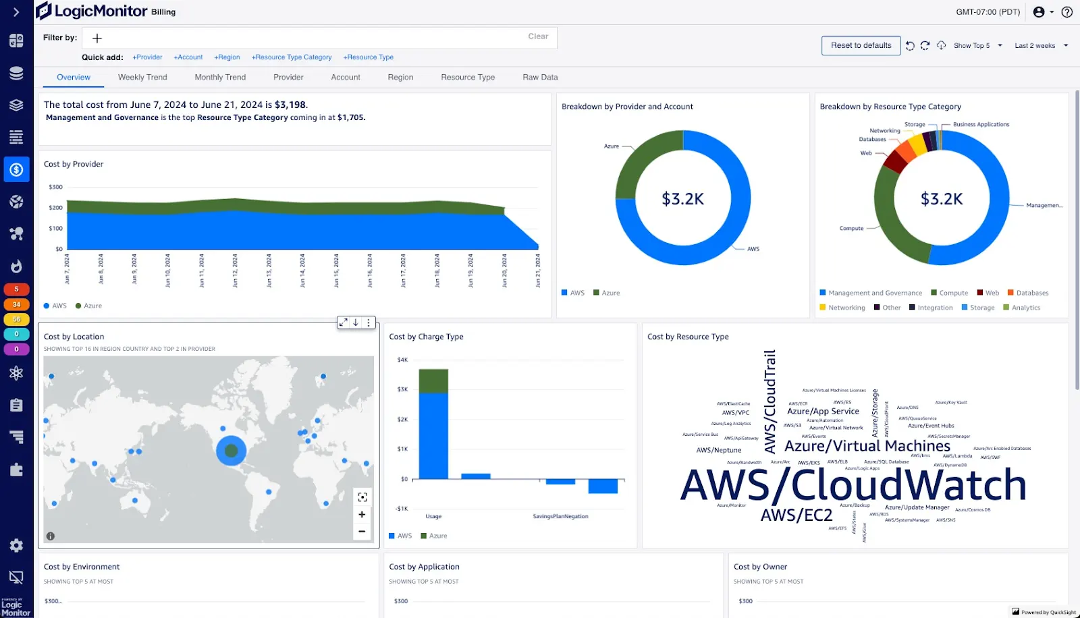
I spearheaded an end-to-end product design initiative for LogicMonitor to visualize cloud infrastructure costs. Within a 90-day sprint, I delivered a high-fidelity suite of widgets that enabled users to monitor their overall costs and pinpoint cost drivers. Beyond its initial release, this framework became a design pillar for cost optimization landing page, driving over $750k+ in the first year of the product with 21 new customers, exceeding 2025 annual goals.
As a core component of LM's new Cost Optimization (CO) product, which empowers ITOps and FinOps to monitor their cloud costs and saving costs by adjusting underused or oversized resources, Billing enhances LM’s Cloud Infrastructure monitoring by visualizing expenditures and enabling users to slice and dice data. This allows for deep-drills into the specific contributors and drivers behind shifting cloud costs.
The product suite encompasses a comprehensive landing page, Cost Optimization Recommendations, Cost Explorer, and Budgets. To establish a robust foundation, we prioritized the design and development of Billing Widget, the modular dashboard visualizations that serve as the primary entry point for cost transparency across the platform.
$750K+
New Annual Recurring Revenue
21
New enterprise subscriptions
40%
Expand cloud monitoring of customers
53%
Reduced clicks to create billing visualization
Why it matters
Build a full observability platform and reduce user frictions.
The goal of this project was to bridge a critical gap in our observability platform: a native, cost-focused monitoring tool for infrastructure. In this context, cost is more than just a financial metric. It is a primary indicator of deployment efficiency and resource health.
The existing solution relied on an external AWS QuickSight integration that was disconnected from the user's primary workflow, resulting in low engagement and high maintenance costs. My mission was to eliminate this friction by designing a customizable, end-to-end cost monitoring experience that feels native to the LogicMonitor ecosystem, allowing users to analyze efficiency and spend without leaving the platform.
Business goals & metrics
Increase ARR (Annual Recurring Revenue)
Increase account adoption
Reduce costs (3rd party integration)
Design goals
Intuitive
Transparent
Trustable
cONSTRAINTS
Platform consistency and tight timeline
Platform consistency and technical limitations.
A major constraint was integrating the billing experience into the existing LogicMonitor Dashboard ecosystem. The platform was originally architected for infrastructure performance metrics, meaning its time granularity and filtering logic didn't align 100% with cost-management use cases. It requires careful handling without breaking the platform consistency.
Tight timeline
The primary challenge was a compressed 90-day timeline. As a legacy QuickSight dashboard already existed, stakeholders initially perceived the design effort as a simple migration rather than a full reimagining. I had to balance intense engineering pressure for immediate delivery with the need to ensure these foundational components were scalable and truly user-centric, rather than just duplicating the previous tool's limitations.
Refine the use cases
What are we building?
"Let's just do a quick migration..."
Legacy AWS Quicksight dashboard. Drilling down is not intuitive to users.
As FinOps are not a traditional user base of LogicMonitor, I am challenged to collect existing user data without launching the product. Instead, I collaborated with Charlie (PM) to collect our insights from the following channels. Based on the conversations, we summarized the use cases:
Refine the Use Cases — Billing Widget
Sales engineers
Potential customers
QuickSight dashboard feedback
Competitive analysis
Core visualizations
Big number
Total spend for selected cloud resources over a chosen time period
Pie / donut / sunburst
View costs segmented by contributor or resource category
Column / stacked bar / area
Track cost change over time with multi-layer breakdown
Slice & dice features
Predefined group-by
Configure a sequence of group-by properties at widget creation
Drill down
Select a segment and analyze it by another group-by property
Time & filter flex
Adjust time range or filters on the dashboard post creation
Cross-product handoff
Jump to Resource Explorer or Cloud Explorer in 2 clicks
Analytical visualizations
Comparison over time
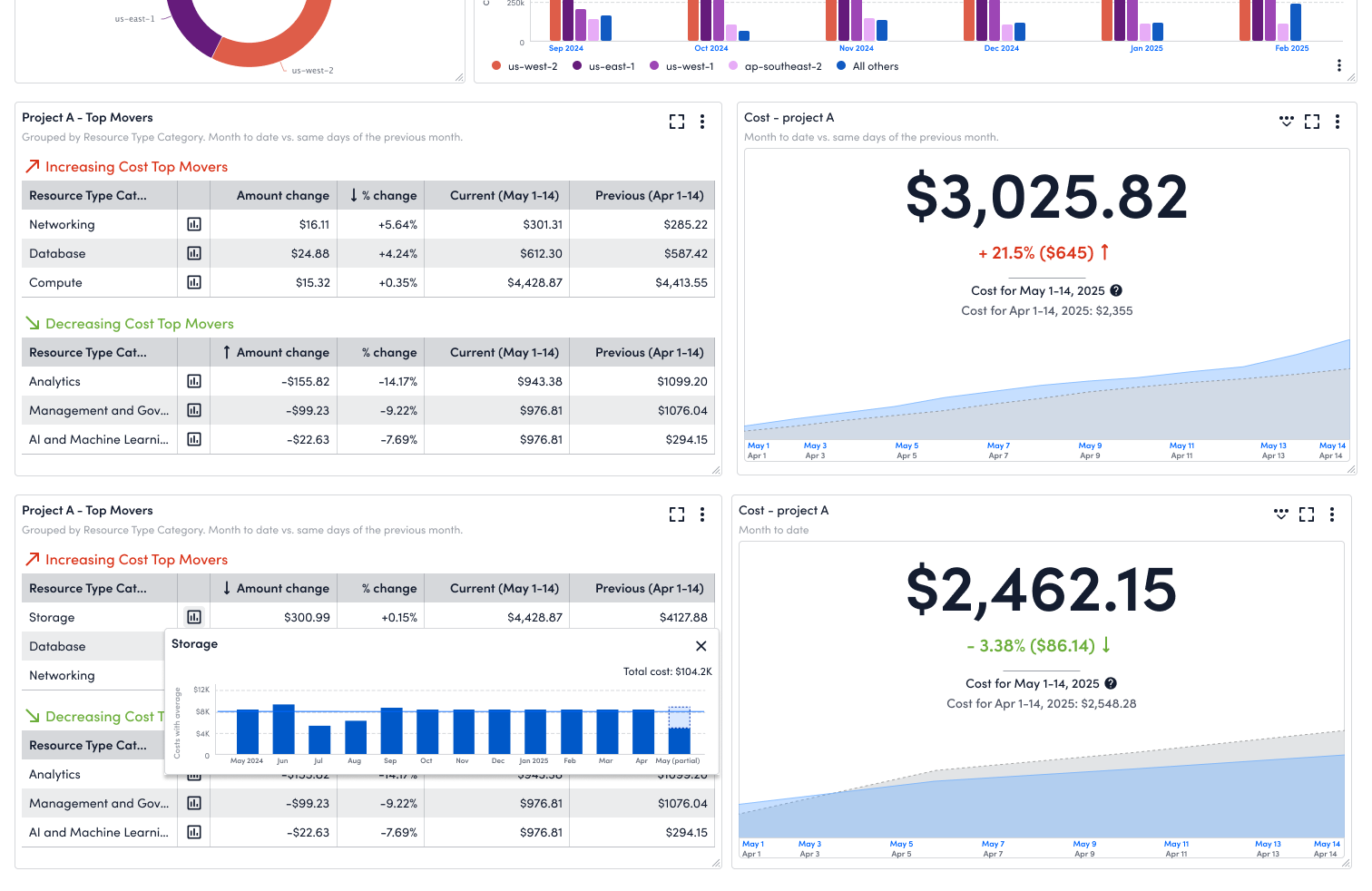
Compare current spend against the same prior period
Top movers
Surface the top runaway segments driving cost spikes
Design plan
Plan design phases
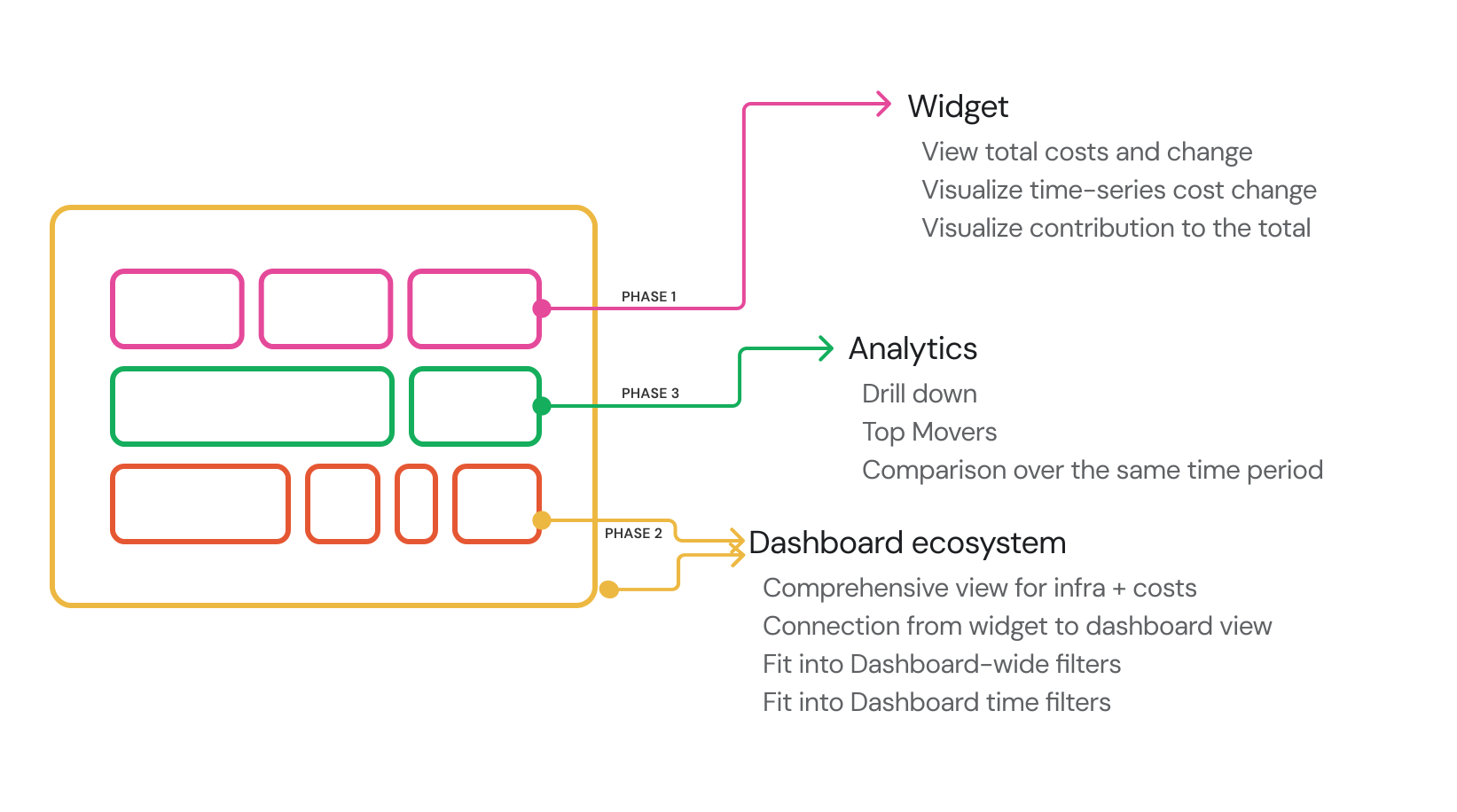
Faced with a tight timeline, I collaborated with Charlie to restructure the design into three phases. This approach mirrored the dashboard’s modular widget architecture, allowing the team to utilize an Agile workflow and ensure an on-time delivery.
We began by focusing on the core feature of the Billing widgets: displaying the costs users incur for their selected cloud resources. Starting at the individual visualization level, we have finalized designs for high-level metrics (Big Number displays), trends over time (line, bar, and stacked area charts), and cost breakdowns by contributor (donut charts).Leveraging our existing dashboard widget foundations accelerated this design phase. Moving forward, our primary focus is streamlining the widget creation flow, defining key charts, and ensuring the interface highlights actionable billing data rather than standard infrastructure monitoring metrics.
With the core visualizations complete, our focus shifted to seamlessly integrating them into the broader dashboard ecosystem and ensuring they meet core FinOps use cases for searching and filtering. The primary challenges in this phase involve resolving misaligned time granularities and innovating the connection between individual widgets and the overall dashboard. While this widget-to-dashboard interaction is a novel pattern for the platform, it is essential for providing users with a comprehensive filtering lens. Resolving this interaction model is our final blocker prior to release.
Building on our foundational visualizations and the new dashboard connections, we expanded the platform's analytical capabilities. We developed advanced visualizations that empower users to drill down into granular data and identify the root causes of anomalous cost spikes. Specifically, this phase introduced robust drill-down functionality alongside a new suite of analytical billing widgets.
Design considerations
Key Design Pivots
Given the aggressive launch timeline, I focused on improving some key experiences:
How might we enable users to create Billing widgets intuitively?
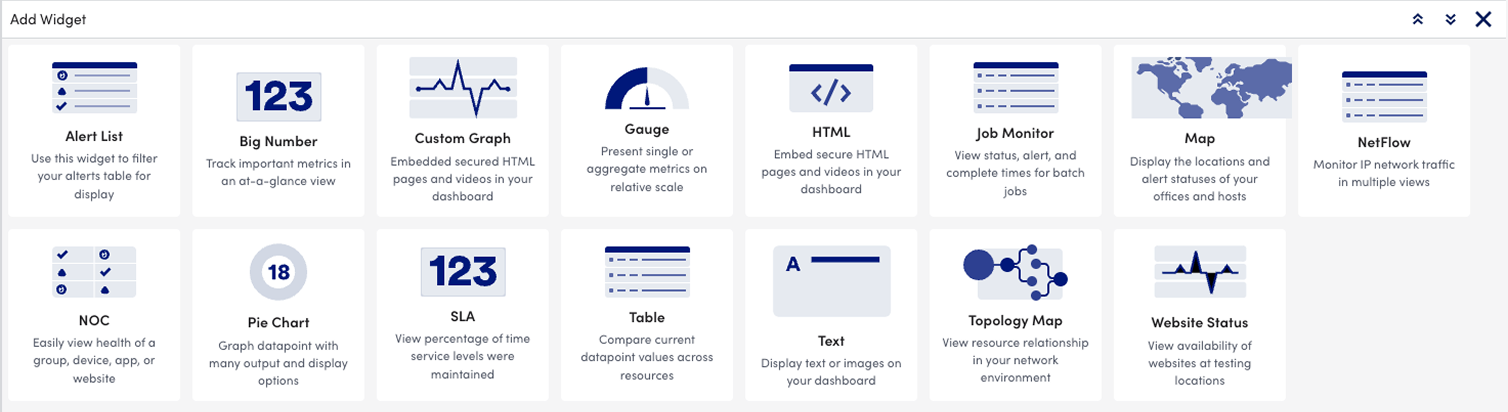
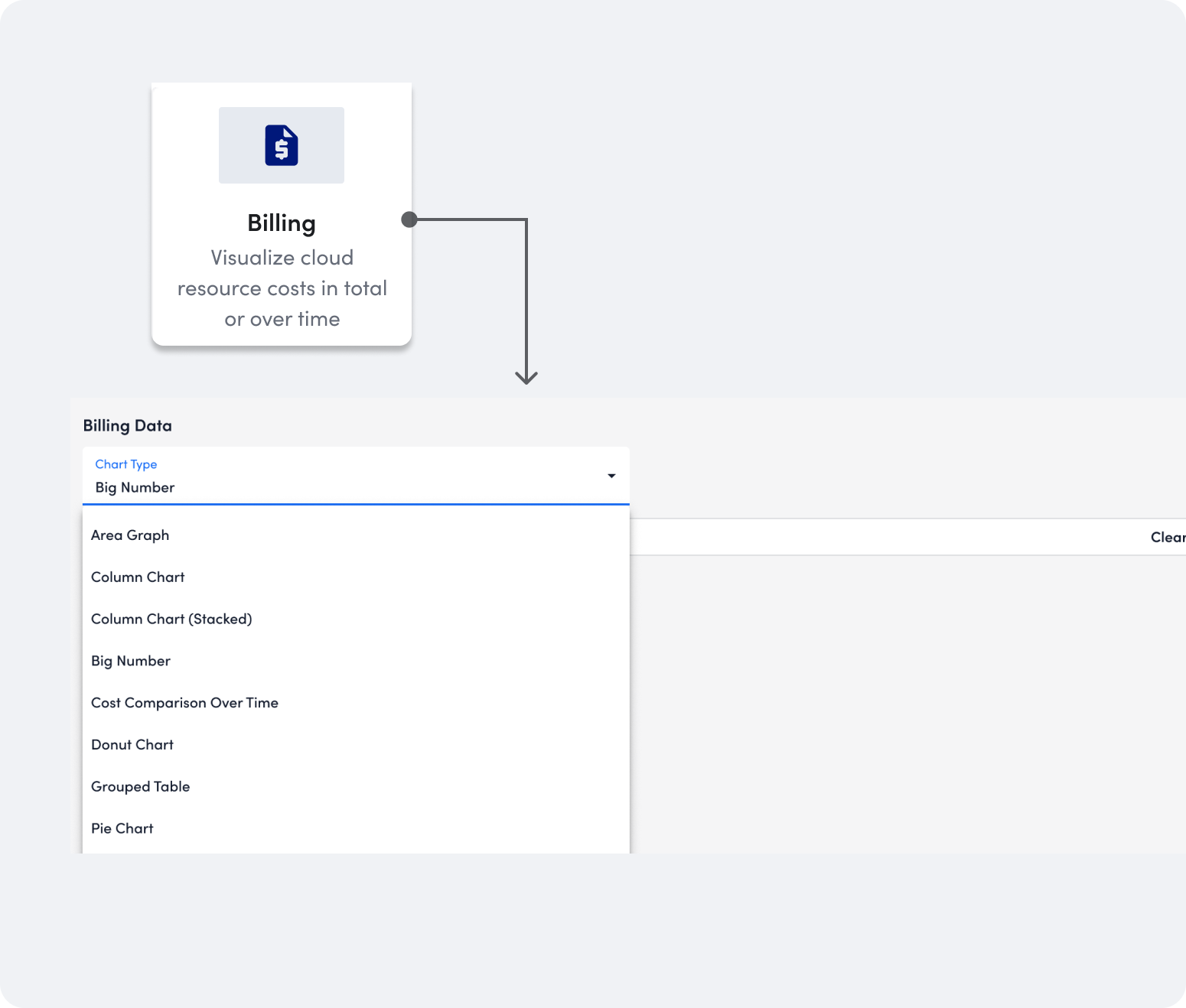
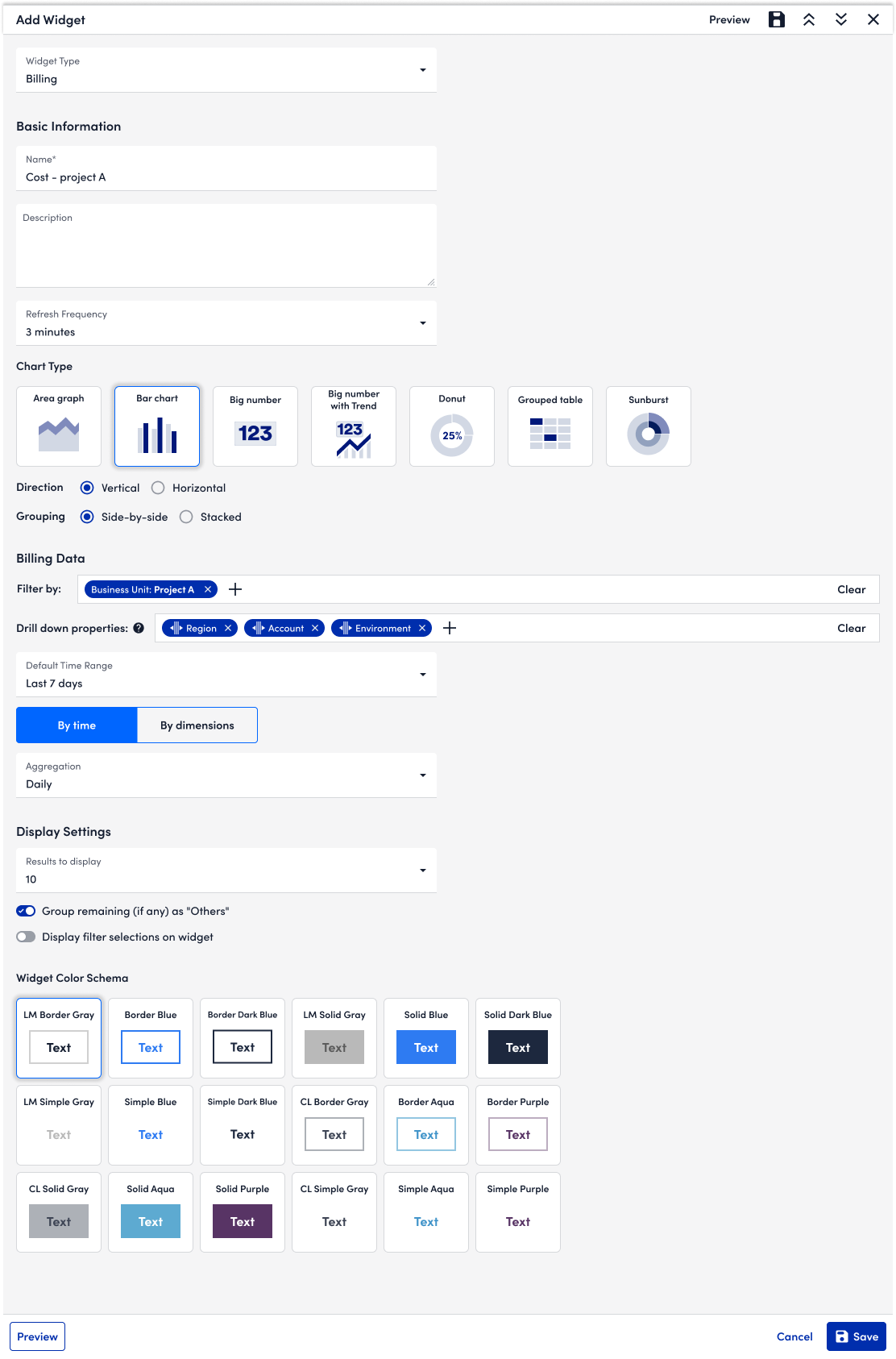
Different from traditional metric widgets that ask users to select a visualization as a widget and manually select datapoint from resources, the experience for Billing widget is more intuitive and simplified. Users may directly visualize the charts for selected costs data and use filters to scope the costs.
Taking creating a donut chart for the costs as an example- in the traditional widget creation experience, it takes at least 17 clicks. With billing widget, the clicks are reduced to 8 clicks. Users efforts are greatly reduced when creating multiple visualizations for the same segment of costs - a typical use case for observing cloud costs - in that they only need to copy an established widget and change the visualization.
Before
After
With growing types of visualizations, it's difficult to identify the visualization quickly. Also for bar charts, we have 4 variations (bar chart, column chart, stacked chart, and side-by-side chart), which makes it even more difficult for users to identify the visualization easily. As a result, I used Chart Type to help users select the visualization.
With users' selection of direction and grouping, the bar chart illustration will change accordingly.
How might we enable users to identify top cost contributors?
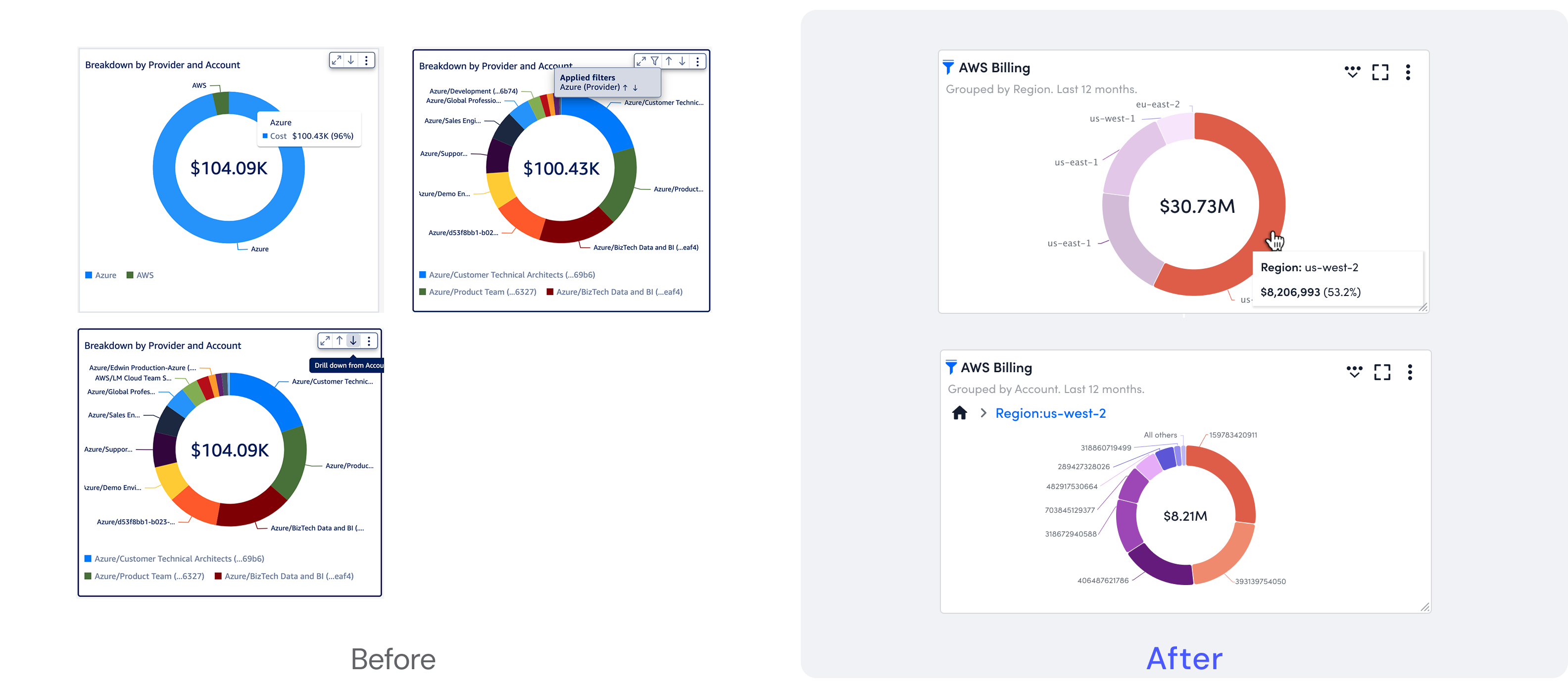
In the legacy version of donut chart, the "Drill-down" experience was a major friction point for users. It made users easily feel lost within the data hierarchy, as there was no persistent visual indicator of their current filter state or depth. The visual clutter from overlapping labels and non-intuitive icon-based navigation further increased the cognitive load.
In the redeisgn, my goal is making sure users could clearly understand the cost and the contributed resources. I introduced a breadcrumb-style navigation system within the widget. This provides an immediate mental map, allowing users to see their active filters and navigate back to higher levels with a single click. I shifted the interaction model so that the chart components themselves act as the primary navigation triggers, making the discovery process more tactile and intuitive.
How might we speed up the discovery of cost spikes?
Beyond standard time-series charts, we introduced "Top Mover" and "Cost trend over time" visualizations that allow users to identify the increments and top movers across selected time range. It helps teams to capture the infrastructure with drastic and unexpected changes in costs, and identify billing anomalies or corresponding infrastructure issues immediately.
How might we make it transparent about the expected results and ccommodate the needs of FinOps?
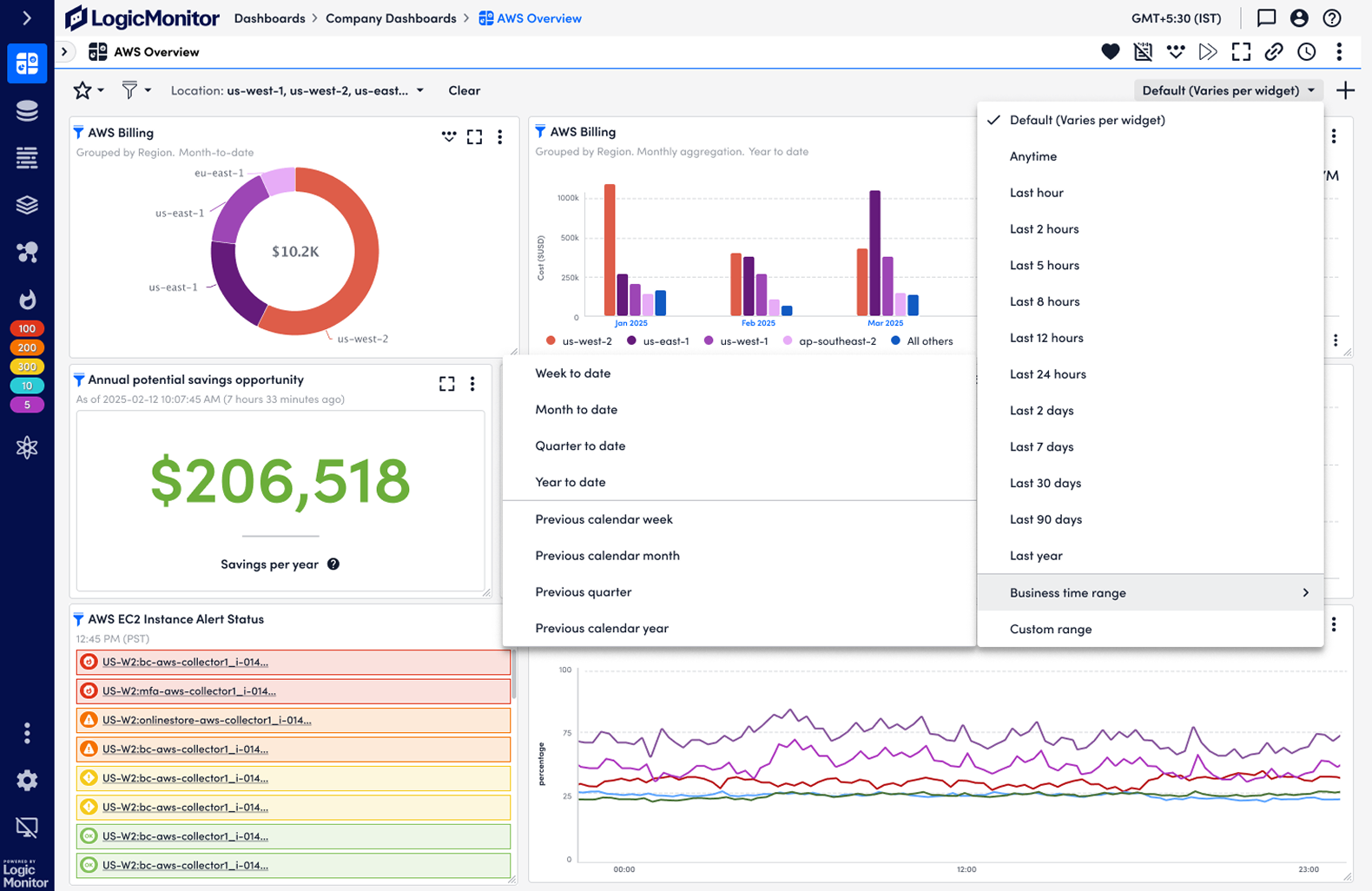
Standard infrastructure metrics typically operate on minute-by-minute granularity. However, cloud billing data is inherently tied to calendar-based units like days or months, where natural business cycles are critical.
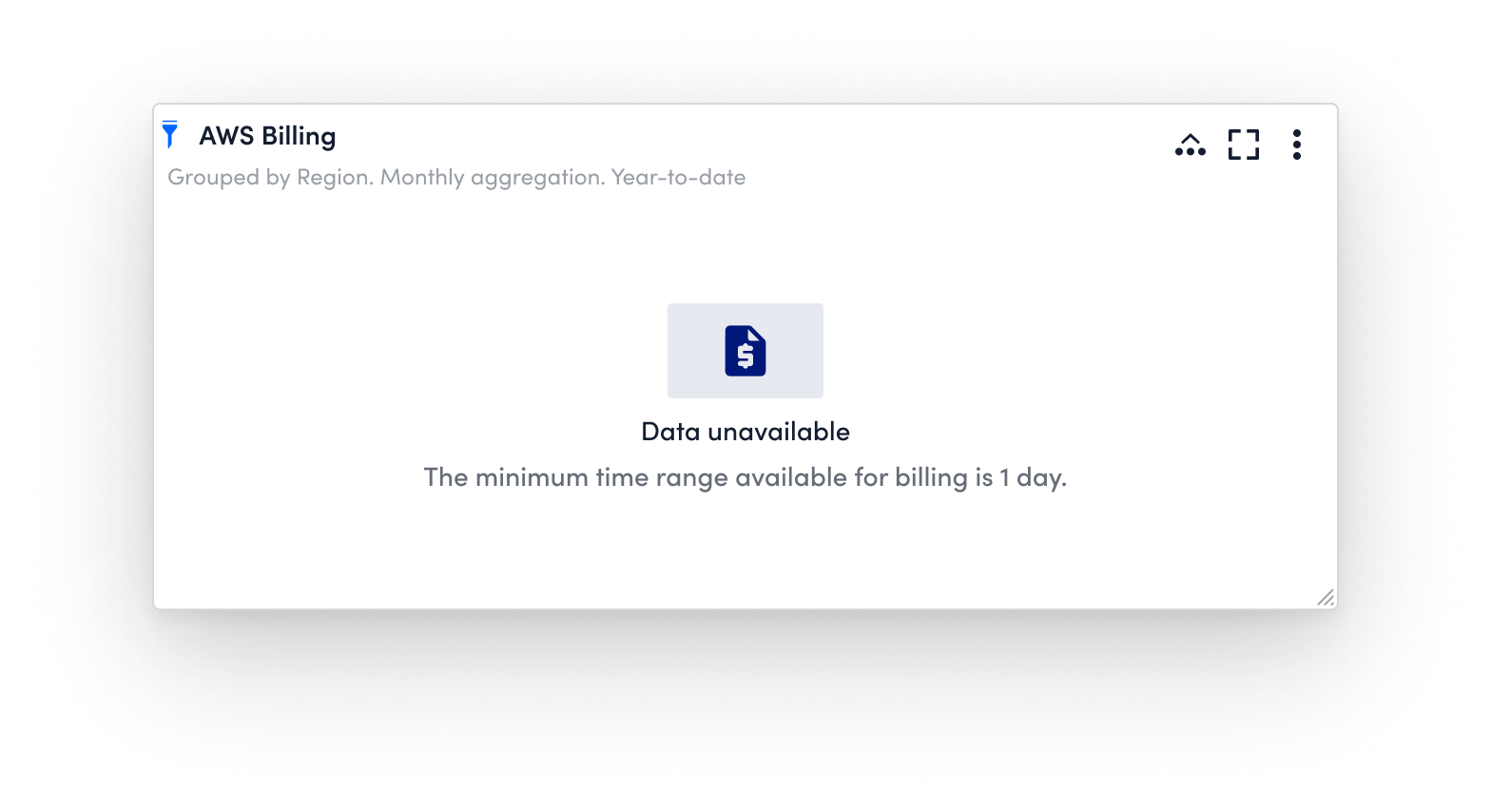
To bridge this gap, I introduced a dedicated Business Time Range option. It defaults to the preferred granularity for cost observation while maintaining consistency with our core platform. I also prioritized graceful degradation: when a user selects a time range that doesn't align with billing cycles, the interface provides clear, instructional 'empty states' rather than just showing broken data. This ensures users understand the data limitations and know exactly how to adjust their time filters to get the insights they need.
Reflections
Three things stayed with me from this project.
Designing for High-Stakes FinOps Decisions. Data visualization is more for viewing. It’s for high-stakes decision-making. When designing for displaying data, what also matters is how it supports users' next step actions, such as finding out the spike trigger or observing the abnomalty in the process.
Navigating Technical Constraints with Elegant Degradation. The reality of enterprise design is that designers must often build upon legacy architecture. Our platform was built for minute-by-minute infrastructure metrics, but our users worked in calendar billing cycles. Instead of blocking the launch for a perfect backend overhaul, I learned the art of technical compromise. By designing proactive instructional empty states and specifying date range, we managed user expectations gracefully. It's a great lesson for me to practice delivering maximum user value while navigating rigid engineering constraints.
Bolder color system and vibe coding. In hindsight, while I heavily prioritized aligning with the existing Dashboard design system to ensure platform consistency, I realize I could have been bolder. Instead of inheriting the legacy salmon palette, adopting a distinct financial color system would have improved users' experience and trust with the platform. Correspondingly, I could have set up the time needed to align the new color system with design system team and establish that as a new component for other charts. Meanwhile, the process of designing and developing a clickable prototype for data visualization would be faster with vibe coding.